
Stop redrawing the single-line diagram every time the circuit list changes
TEKHAT reads the circuit list you already keep in Excel and produces the single-line diagram (DXF) and the load schedules for every panel in one run – consistent with each other, with phase balance, breaker, RCD and cable checks done before anything is drawn. No AutoCAD required.
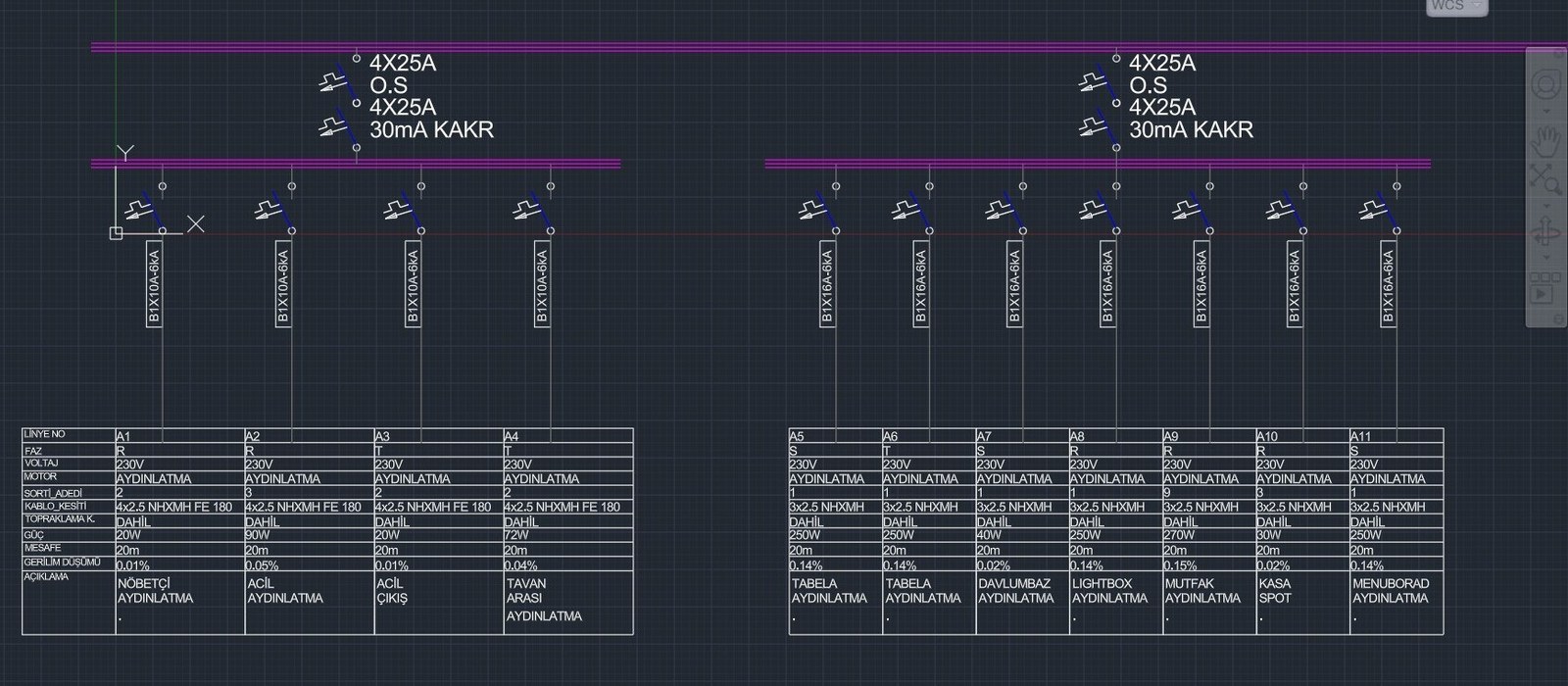

What TEKHAT does for you
1 circuit list → 2 deliverables
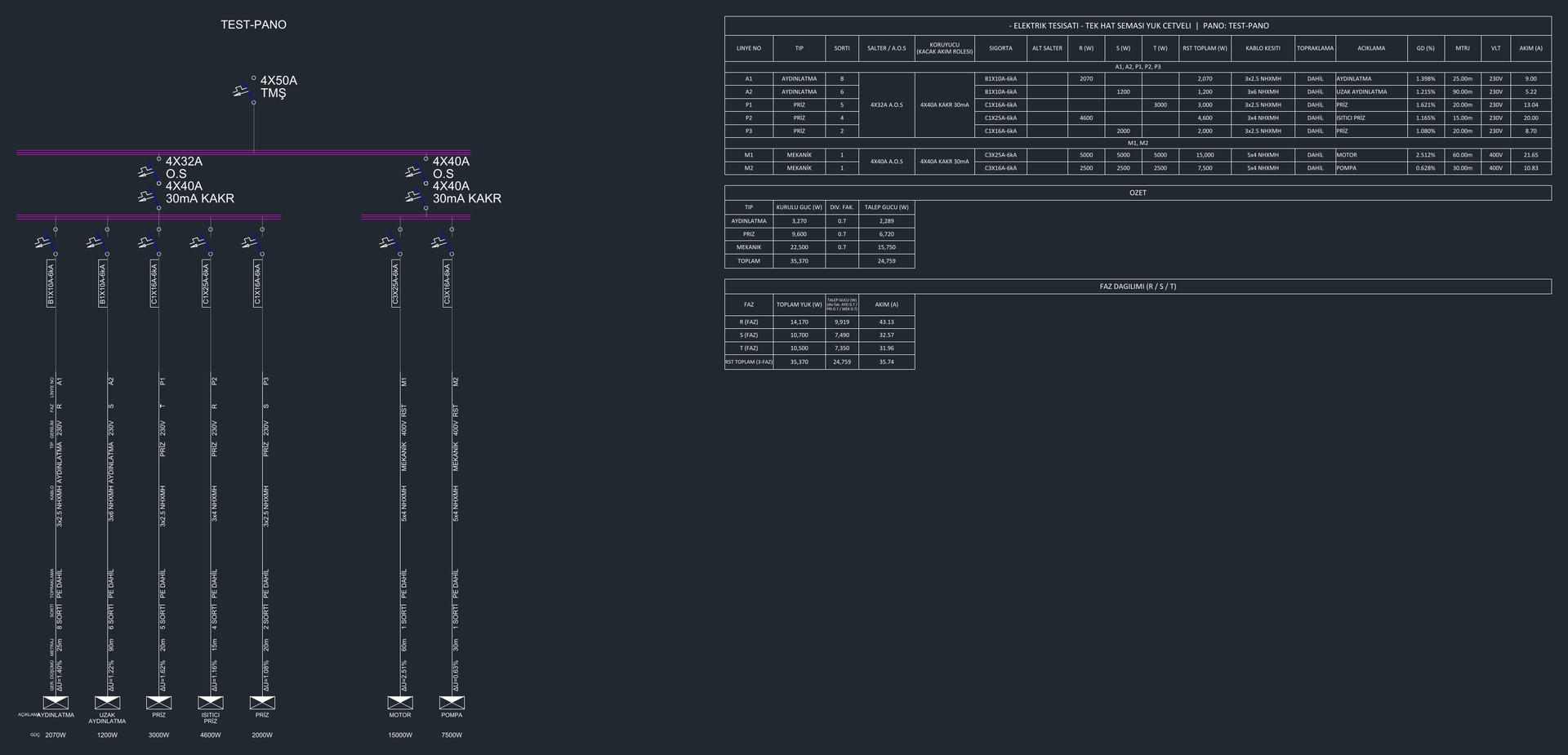
The single-line diagram and the load schedule workbook come from the same data in one run. Change the list, press GENERATE again – no redrawing by hand.
Engineering checks before drawing
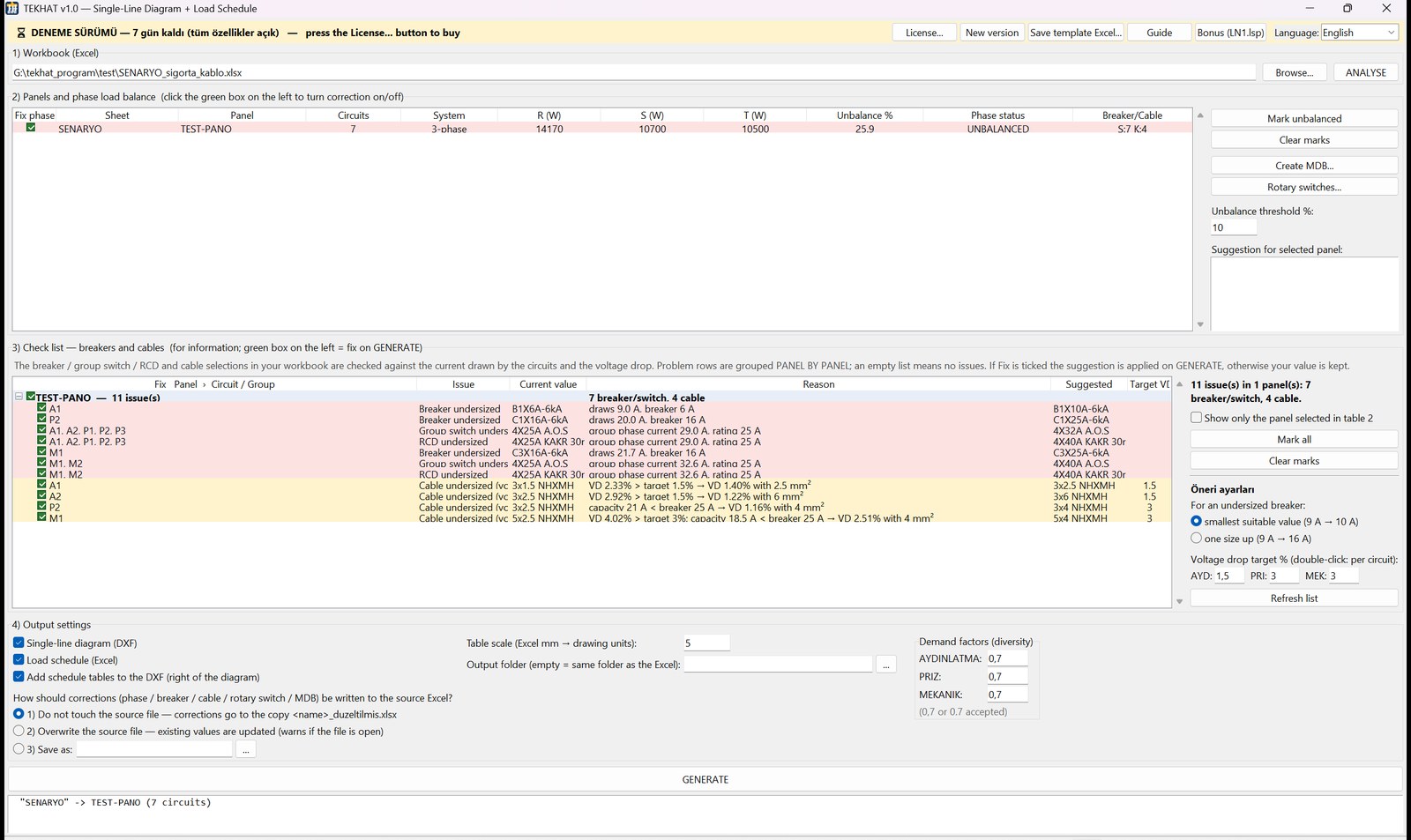
R/S/T phase balance with a minimal-change suggestion; breakers, group switches, RCDs and main breaker against the calculated currents; cables against voltage drop (default targets: lighting 1.5 %, sockets 3 %, mechanical 3 %) and current capacity.
Opens in 6 CAD programs
DXF with real blocks and attributes, layers and ByBlock colours – opens in AutoCAD, AutoCAD LT, BricsCAD, ZWCAD, GstarCAD and NanoCAD. Edit any value with a double-click.
You stay in control
Every finding shows the current value, the reason and a suggested value. Tick the corrections you accept, row by row – your own values are kept otherwise.
How it works in 3 steps
1Open your circuit list
One Excel sheet per distribution panel (circuit no., phase, power, cable, breaker, group switch, RCD…). A ready template is included – or enter the circuits in the built-in form, Excel is not required.
2Review the check list
TEKHAT analyses every panel and lists undersized breakers, RCDs and cables with a suggested value (“smallest suitable” or “one size up”). Unbalanced panels are flagged; single-phase panels are skipped.
3Press GENERATE
You get the single-line DXF (circuit-table or feeder style), the load schedule workbook per panel and per main distribution board with demand factors, the schedules drawn as tables next to the diagram (optional) and a corrected copy of your workbook.
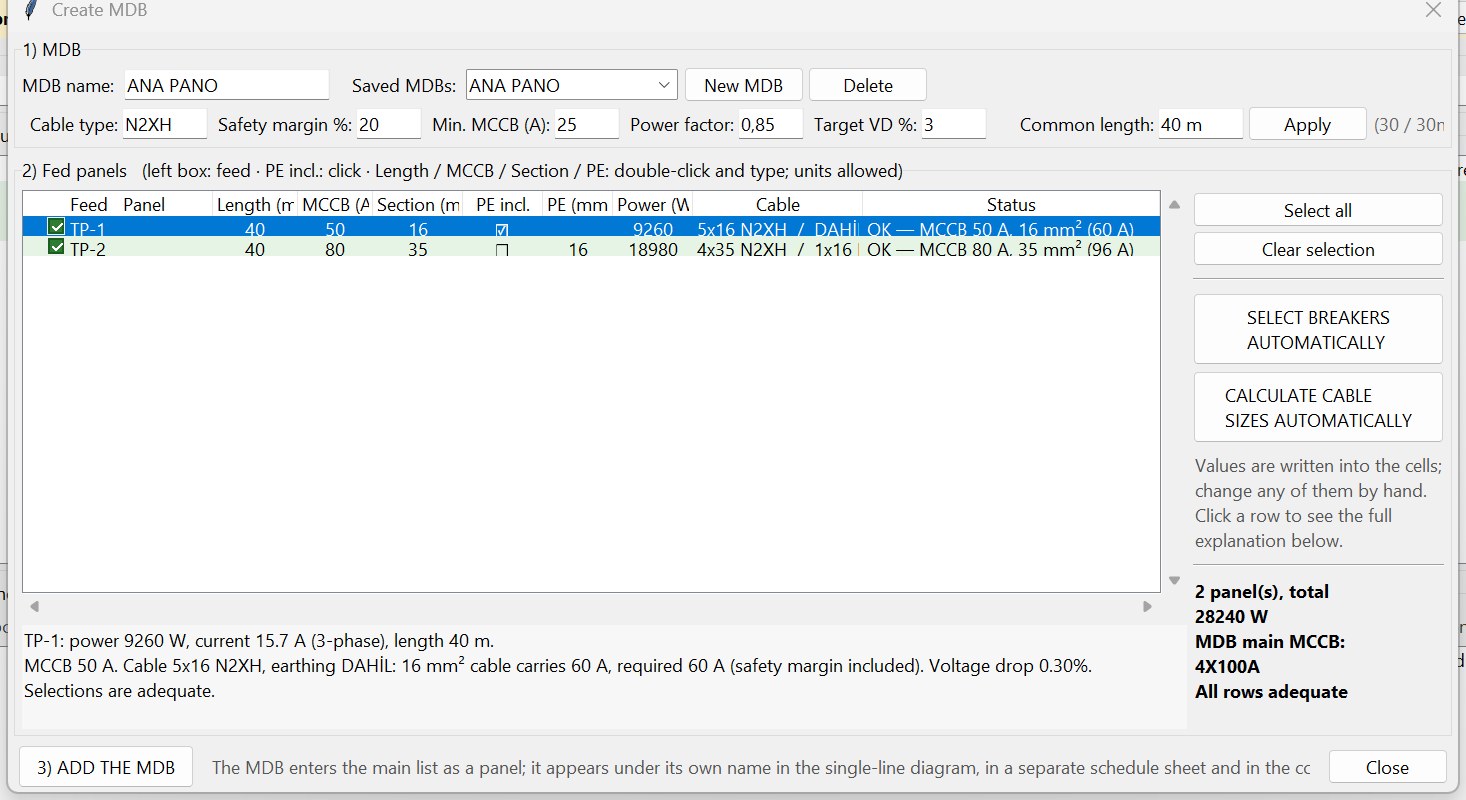
Main distribution boards, too
The MDB builder lets you pick the fed panels and enter the lengths; main breakers and cable sizes are proposed with a safety margin. Cascaded MDBs work, MDBs already defined in Excel are recognised, and MDB schedules never count the same load twice. Lighting rotary switches and FE180 fire-resistant cables are supported.
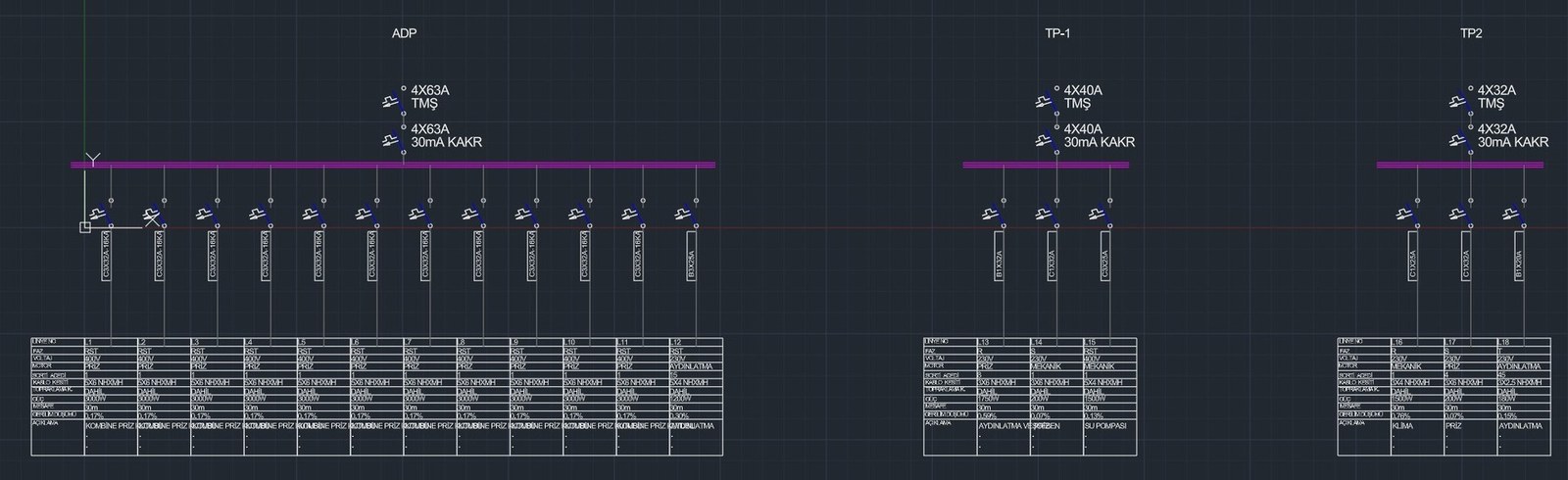
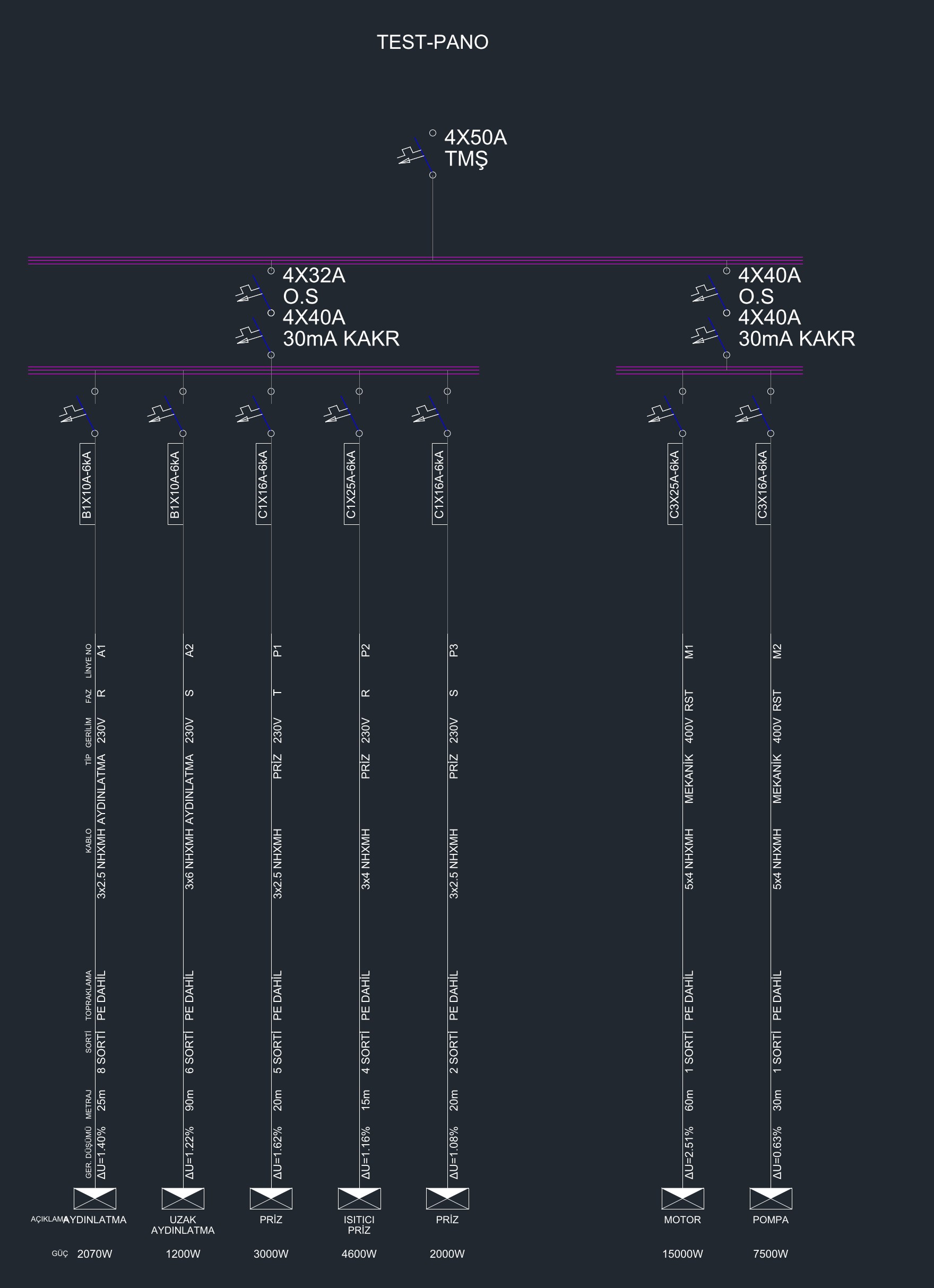
Feeder style: every circuit as a vertical feeder with its data along the line.
Who it’s for
- Electrical design engineers and MEP offices who draw single-line diagrams and load schedules for buildings.
- Residential and small to mid-size commercial projects with many distribution panels.
- Teams that work in AutoCAD, AutoCAD LT, BricsCAD, ZWCAD, GstarCAD or NanoCAD.
- Anyone who wants the diagram and the schedule to stay consistent when the circuit list changes.
Course bonus: buyers of the Electrical Power Systems Design course get 50 % off the TEKHAT site licence.
Pricing
| Option | Covers | Price |
|---|---|---|
| Microsoft Store (in-app) | All your Windows devices (same Microsoft account) | 20 € |
| Site licence | 1 computer | 15 € |
| 2 computers | 20 € | |
| 3 computers | 25 € | |
| 5 computers | 35 € | |
| 10 computers | 60 € |
Site licence: 15 € for the first computer, +5 € for each extra one. Lifetime licence, free 1.x updates, licence details by e-mail, invoice from EMECH CENTER OÜ.
Which to choose? Store = all your devices, paid in the Store. Site licence = cheaper for 1 computer, the same price for 2.
Try every feature free for 30 days
Install TEKHAT free from the Microsoft Store – the 30-day trial has no limits. Updates arrive automatically through the Store. When you are convinced, buy the licence in the Store or here on our site.
Frequently asked questions
Do I need AutoCAD?
No. TEKHAT is a standalone Windows program that writes DXF. The DXF opens in AutoCAD, AutoCAD LT, BricsCAD, ZWCAD, GstarCAD and NanoCAD.
Do I need Excel?
No. TEKHAT reads and writes Excel workbooks itself, and you can also enter the circuits in its built-in form. A ready template with one sheet per panel is included.
How does the free trial work?
Install TEKHAT free from the Microsoft Store. All features work for 30 days. After that, buy the licence in the Store (20 €, all your devices) or a site licence here (from 15 €).
Can I move my licence to a new computer?
Yes. The Store licence follows your Microsoft account to all your Windows devices. A site licence is bound to a computer and can be moved to another computer at any time.
How do I activate a site licence?
Install TEKHAT from the Microsoft Store and activate it with the e-mail address of your order. The licence is checked online, so an internet connection is needed.
What are the system requirements?
Windows 10 or 11, 64-bit. Nothing else to install. The interface is available in 18 languages and your files never leave your computer.
Are updates included?
Yes. The licence is lifetime and all 1.x updates are free. They are delivered automatically through the Microsoft Store.
Your circuit list in. Single-line diagram and load schedules out.
Start the 30-day free trial today.
AutoCAD and AutoCAD LT are trademarks of Autodesk, Inc.
{“@context”:”https://schema.org”,”@type”:”SoftwareApplication”,”name”:”TEKHAT – Single-Line Diagram & Load Schedule”,”operatingSystem”:”Windows 10, Windows 11″,”applicationCategory”:”DesignApplication”,”downloadUrl”:”https://apps.microsoft.com/detail/9p27bdnxvtn0″,”offers”:[{“@type”:”Offer”,”price”:”20.00″,”priceCurrency”:”EUR”,”url”:”https://apps.microsoft.com/detail/9p27bdnxvtn0″,”description”:”Microsoft Store licence, all your Windows devices”},{“@type”:”Offer”,”price”:”15.00″,”priceCurrency”:”EUR”,”url”:”https://mep.center/?p=4911″,”description”:”Site licence, 1 computer (+5 EUR per extra computer)”}]}
Reviews
There are no reviews yet.